Skip to content
Rx-Universe Horizontal Logo_Full Color

Your Optical Lab's Instant Digital Consultant

Operational questions do not always need to become support tickets. Often, the answer is already available in Rx-Universe documentation, but finding the right page can take time.

Rovo gives Rx-Universe users a faster, more conversational way to explore our Confluence knowledge base. Ask a question in plain language, and Rovo can provide focused guidance, summarize relevant information, and connect you directly to the supporting documentation.

Meet Your Digital Lab Consultant

Think of Rovo as your Digital Lab Consultant and a useful first line for everyday LMS and lab operational questions. Instead of searching through multiple pages or trying to identify the right keywords, simply describe what you need help with.

With Rovo, you can:

  • Ask questions in plain language

  • Receive focused answers based on Rx-Universe documentation

  • Open links to the original source material

  • Ask follow-up questions for additional clarification

  • Find practical guidance without interrupting your workflow

1Rovo1-1

 Ready to put your Digital Lab Consultant to work? 


If you do not see Ask Rovo or cannot access the Rx-Universe Confluence knowledge base, please contact Rx-Universe Support.


Quick tip: Give Rovo the right context

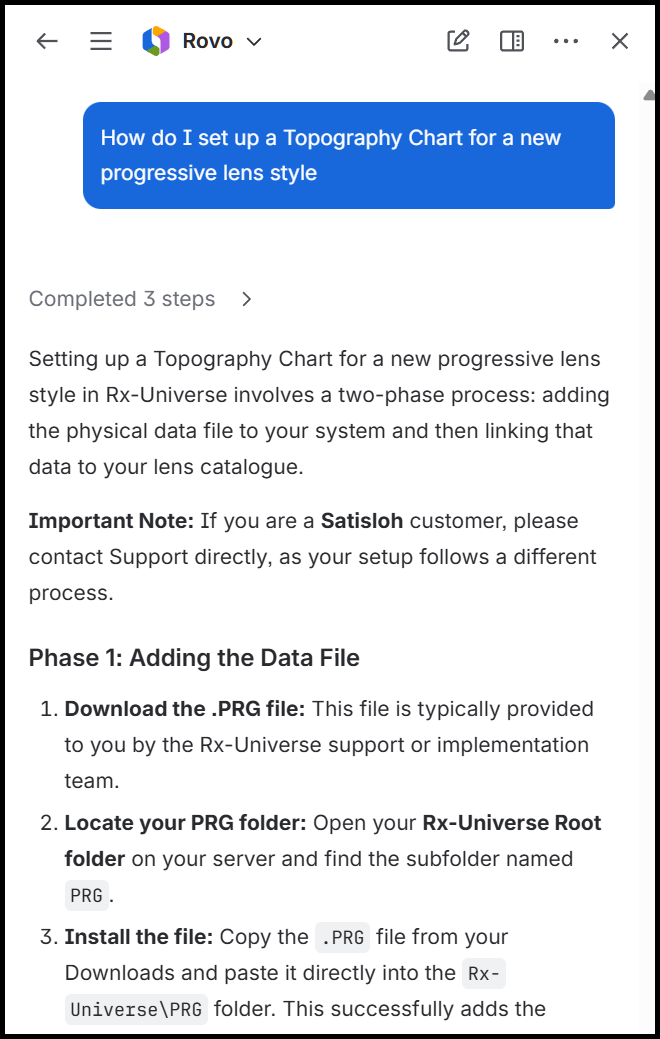
Include the task, module, equipment, or desired result in your question. For example, instead of asking, “How do I set this up?” try asking, “How do I set up a Topography Chart for a new progressive lens style?” The more specific your question is, the easier it is for Rovo to identify the most relevant documentation.

Practical Answers for Everyday Operations

Rovo can assist with a wide range of common Rx-Universe questions. Here are a few ways it can help your team:

Find technical configuration guidance

Ask Rovo how to configure a Topography Chart for a new progressive lens style, and it can locate the relevant documentation, explain the required steps, and identify when additional information may be needed from Rx-Universe Support.

Support employee training

Rovo can explain how to use tools such as the Job Scanner Simulator to test station workflows and barcode triggers without requiring physical scanning hardware or interrupting live production.

Plan your hardware with confidence

Ask about recommended server specifications based on your lab’s processing volume, and Rovo can direct you to the applicable system requirements and supporting documentation.

When Should You Contact Rx-Universe Support?

Make Rovo your first stop for general how-to questions and documented operational guidance. If your question involves a lab-specific configuration, unexpected system behavior, or an issue that requires hands-on investigation, the Rx-Universe Support team is still here to help. Rovo does not replace Support. It gives your team another convenient way to answer routine questions, access helpful resources, and keep daily operations moving.

Already an Rx-Universe user?

Open the Rx-Universe Confluence knowledge base and look for the Ask Rovo icon. Your next answer may be just a question away.

rovoicon3

Not an Rx-Universe user?

Discover how Rx-Universe combines modern LMS functionality with AI-powered tools like Rovo to make operational knowledge easier to access. Help your team answer routine questions, find guidance faster, and keep daily operations moving.

Request a demo to see what smarter, more connected lab operations could look like for your team.

Leave a Comment